AI Driveway Design: Creative Ideas, Tips & Inspiration
Reimagine Your Yard · 12 September 2026
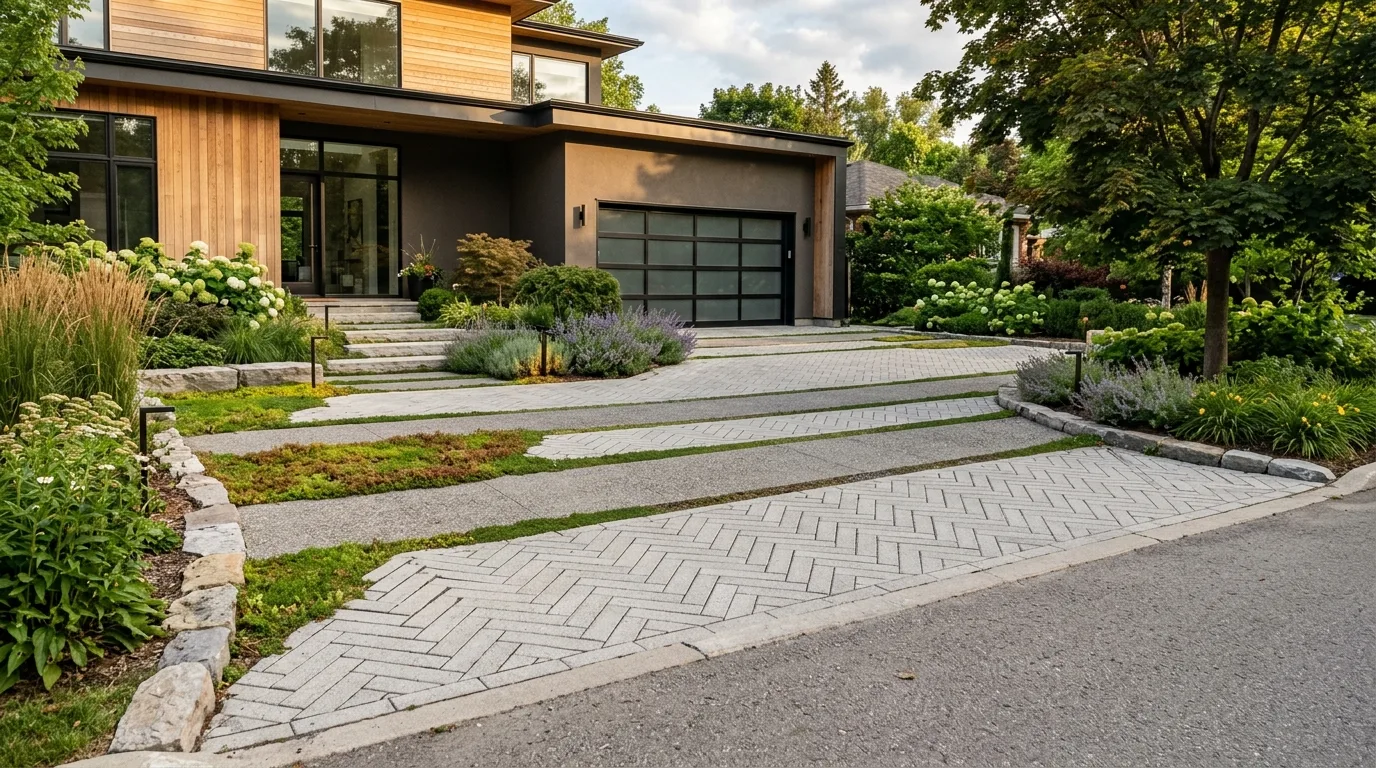
Your driveway is more than just a functional place to park your vehicles; it serves as the grand entrance to your property and sets the visual tone for your entire home. Upgrading your front entrance traditionally required hiring expensive landscape architects or taking a gamble on costly paver samples. Today, AI driveway design is revolutionising how homeowners plan exterior renovations, allowing you to experiment with materials, borders, and surrounding foliage before committing to contractors or delivery orders.
Whether you are considering a sleek resin-bound surface, traditional stone pavers, or an eco-friendly permeable layout, leveraging artificial intelligence helps you explore endless creative possibilities. In this comprehensive guide, we will break down top driveway styles, practical tips for capturing and visualizing exterior upgrades, and how you can use digital tools on reimagineyouryard.com to bring your vision to life.
Why Use AI Driveway Design to Transform Your Home's Curb Appeal?
Visualising hardscaping improvements can be surprisingly difficult when looking at small swatches in a home improvement store. A single stone block rarely tells you how an entire 500-square-foot driveway will look against your home's siding, roof color, and surrounding front garden. Utilizing smart visualization software bridges the gap between raw ideas and photorealistic execution.
Instant Visualisation of Complex Hardscape Materials
Different materials dramatically alter the architectural character of your home. Natural gravel blends project a charming, rustic vibe, while polished charcoal pavers lend a crisp, luxury finish. An AI-powered design generator allows you to swap out ground surfaces digitally in seconds, helping you compare textures, colors, and pattern directions without spending money on physical samples.
Harmonising Driveways with Surrounding Landscaping
A great driveway does not exist in isolation. It works hand-in-hand with front yard lawns, retaining walls, planting beds, and exterior home lighting. By generating realistic rendering concepts of your front property, you can see how proposed hardscaping interacts with surrounding shrubs, specimen trees, and property boundaries.
Top Driveway Layouts and Material Ideas to Test
Before jumping into digital design tools, it helps to understand which hardscape styles align best with your home’s architecture. Here are several of the most popular driveway ideas homeowners are exploring today.
1. Modern Resin-Bound and Smooth Concrete Pavers
Resin-bound aggregate and large-format smooth concrete pavers are extremely popular for contemporary homes. They offer a seamless, minimalist appearance that emphasizes clean architectural lines. Pairing light gray or charcoal resin with dark brick borders creates a sharp frame that guides the eye directly toward your front entryway.
2. Classic Cobblestone and Heritage Brick Patterns
If you own a Victorian, Craftsman, or traditional cottage-style home, classic cobblestones, tumbled pavers, or herringbone brick layouts add timeless elegance. Using varied tone ranges—such as warm terracottas mixed with subtle charcoal accents—creates rich visual depth that elevates period architecture.
3. Eco-Friendly Permeable and Mixed Gravel Driveways
Permeable paving solutions, including open-grid turf pavers or crushed stone, offer eco-conscious drainage benefits while creating a softened, organic aesthetic. Gravel driveways bordered by solid granite setts keep aggregate contained while delivering a refined European estate feel.
4. Strategic Curves and Welcoming Aprons
The footprint of your driveway affects functionality just as much as appearance. A straight approach maximises space on compact suburban lots, while sweeping curves add drama to sprawling properties. Adding a flared driveway apron—a widened entrance area crafted with contrasting paver borders—creates a generous, inviting approach for visiting guests.
Practical Tips for Planning Your Driveway Upgrade with AI
To get the most accurate and inspiring renders from generative software, following a structured planning process is essential. Here is how to achieve the best results for your property upgrade.
1. Capture the Perfect Base Photo
Your base photo forms the foundation for your virtual visualisations. Follow these quick guidelines to capture ideal source imagery before uploading:
- Choose Natural Daylight: Take photos on a bright, overcast day or during soft morning light to avoid harsh, distracting shadows across the pavement.
- Include Full Context: Stand far enough back to capture your home's front facade, main entrance, garage doors, and full existing driveway perimeter.
- Clear Loose Objects: Park cars down the street and clear away trash bins, garden hoses, or debris so your baseline image is clean and uncluttered.
2. Explore the Design Studio for Exterior Overhauls
Inside reimagineyouryard.com, your primary workspace for exploring major structural concepts is the Design Studio. By navigating to the Exterior or Landscape modules, you can upload your base photo and generate dramatic style transformations. Test modern minimalist approaches, lush country cottage entrances, or crisp geometric paving layouts with effortless AI prompts.
3. Test Specific Products with the Product Visualiser
If you have found a specific paver block, decorative gravel mix, or driveway gate at a local building supplier, use our Product Visualiser tool. This tool allows you to combine a photo of your actual space with a photo of a specific product item, giving you a clear visual idea of how that exact material fits into your real-world backdrop.
4. Explore Your Driveway in True 3D
When assessing spatial layouts, seeing the space from more than one angle helps you evaluate proportions and depth:
- True 3D Walkthrough: For an immersive visual experience, users can unlock interactive walkthrough renders. This advanced feature costs 5 credits and requires a previous credit purchase on the platform.
How to Bridge the Gap from AI Concepts to Real-World Execution
Once you have generated conceptual renders that you love, it is time to transition from digital ideas to physical installation. Keep these practical steps in mind during your project planning:
Consult Local Codes and Utility Mapping
Before breaking ground or purchasing materials, check municipal regulations regarding driveway apron widths, sidewalk crossovers, property setbacks, and permeable surface mandates. Always contact local utility location services before excavating to identify underground water, gas, or electrical lines.
Factor in Drainage and Surface Grading
A beautiful driveway must handle stormwater effectively. Ensure your paving contractor incorporates adequate drainage channels, catch basins, or permeable sub-bases to direct surface runoff safely away from your home's foundation.
Share Renderings with Hardscaping Contractors
Concept images generated through AI serve as an exceptional communication tool. Rather than trying to describe complex border designs or material pairings verbally, present your visual renders directly to hardscape professionals during bidding. This ensures contractors understand your exact aesthetic vision from day one.
Start Designing Your Dream Driveway Today
Transforming your home's curb appeal has never been simpler or more inspiring. By combining smart AI driveway design strategies with practical hardscaping planning, you can explore endless material options, optimize your front yard layout, and make confident design decisions before spending money on construction.
Ready to see your property's full potential? Visit reimagineyouryard.com today, create your account to receive initial starter credits, and start experimenting with our Design Studio and Product Visualiser!